The Hardware Asset Lifecycle
Understanding and managing the five critical stages that govern every IT asset from initial request to final disposal.
Lifecycle Overview: Why Structure Matters
Every piece of hardware in your organization follows a predictable journey from initial business need to final disposal. Organizations that formalize this journey through structured lifecycle management achieve dramatically better outcomes than those managing assets reactively.
The hardware asset lifecycle consists of five distinct stages, each with specific objectives, stakeholders, and decision points:
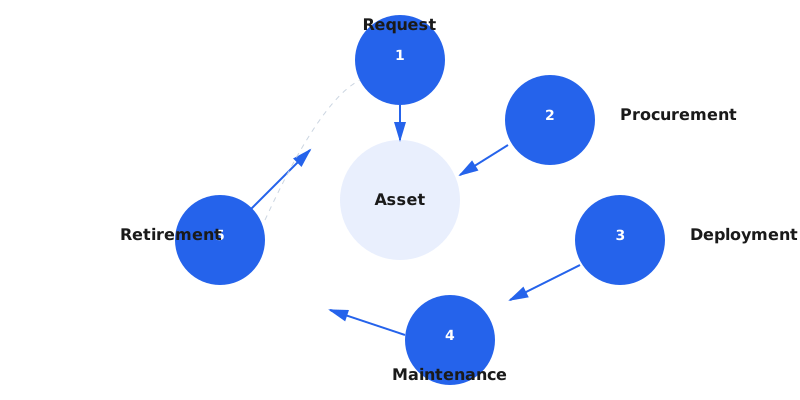
What separates world-class HAM programs from ad-hoc tracking is attention to lifecycle transitions. Assets don't just exist in a single state—they move through stages, and those transitions are where visibility is lost, costs balloon, and security vulnerabilities emerge. Every transition requires documentation, approval, and system updates.
Lifecycle Philosophy: An asset in motion stays tracked; an asset at rest becomes a ghost. The most critical HAM capability is capturing and recording every lifecycle transition the moment it occurs, not during quarterly reconciliation.
Stage 1: Request
The lifecycle begins before the asset physically exists—when someone identifies a business need for new hardware. The request stage transforms informal needs ("I need a laptop") into structured, approvable requirements.
Request Stage Objectives
- Validate business justification for new hardware acquisition
- Prevent impulse purchases and duplicate acquisitions
- Ensure requested hardware aligns with organizational standards
- Obtain necessary budget approvals before procurement
- Check existing inventory for available redeployment opportunities
Key Activities
Needs Assessment: Why is the hardware needed? Is this replacing failed equipment, supporting a new hire, enabling a project, or upgrading aging devices? The answer determines urgency, budget source, and approval path.
Inventory Check: Before approving any new purchase, search existing assets for available devices in storage, recently returned from separated employees, or underutilized in other departments. Organizations with strong HAM reuse 15-20% of requests from existing inventory, avoiding unnecessary procurement.
Specification Validation: Does the requested hardware meet minimum organizational standards? Consumer-grade equipment may lack security features, serviceability, or warranty coverage required by IT policy.
Budget Approval: Hardware requests require financial approval from appropriate authorities. The approval threshold varies by organization—some require CFO signoff for all technology purchases, others delegate up to $5,000 to department managers.
Request Stage Checklist
| Task | Owner | Required Information |
|---|---|---|
| Submit hardware request | End user or manager | Asset type, quantity, business justification, cost center, urgency |
| Search existing inventory | IT asset coordinator | Available devices matching specifications |
| Validate specifications | IT standards team | Compliance with hardware standards and security requirements |
| Budget approval | Finance or department head | Cost estimate, budget code, financial approval |
| Procurement authorization | IT director | Approved request forwarded to procurement team |
Common Failure Point: Organizations that skip the request stage and allow direct procurement create chaos. Shadow IT purchases bypass security vetting, warranty tracking, and budget visibility. Every hardware acquisition must flow through a formal request process, even when purchased with departmental budgets.
Stage 2: Procurement
Procurement transforms an approved request into a physical asset. This stage establishes the initial data foundation that will follow the asset through its entire lifecycle.
Procurement Stage Objectives
- Acquire approved hardware at optimal cost with appropriate warranty coverage
- Register assets in tracking system upon receipt with complete baseline data
- Establish asset ownership and financial accountability
- Capture warranty, support entitlements, and vendor relationships
- Enable accurate financial reporting for capital asset management
Key Activities
Vendor Selection: Choose suppliers based on price, warranty terms, delivery timeline, and post-purchase support. Many organizations maintain preferred vendor relationships that guarantee standardized configurations, volume discounts, and streamlined warranty claims.
Purchase Order Creation: The PO documents the financial commitment and provides the audit trail connecting the asset to its acquisition cost. PO numbers become part of the asset record for financial reconciliation.
Receipt and Inspection: Upon delivery, receiving staff verify the shipment matches the PO in quantity and specifications. This is the critical moment to capture serial numbers, model details, and manufacturer information before the asset enters circulation.
Asset Registration: Create the initial asset record in your HAM system with all baseline data:
- Manufacturer and model
- Serial number and MAC address
- Purchase order number and date
- Acquisition cost and cost center
- Warranty start date, duration, and service level
- Vendor contact information for support
- Initial status (received, in preparation, in storage)
Asset Tagging: Apply a physical asset tag with a unique identifier (barcode, QR code, or RFID tag) to the device. This tag becomes the permanent link between the physical hardware and its digital record. Asset tags should be durable, tamper-evident, and placed in consistent locations for easy scanning.
Procurement Stage Checklist
| Task | Owner | Required Information |
|---|---|---|
| Create purchase order | Procurement team | Vendor, specifications, quantity, cost, delivery location |
| Receive shipment | Receiving/mailroom | Verify quantity and condition, sign delivery receipt |
| Initial inspection | IT asset coordinator | Match received items to PO, check for shipping damage |
| Record serial numbers | IT asset coordinator | Serial number, MAC address, model details for each unit |
| Create HAM records | IT asset coordinator | Complete asset records with all baseline data |
| Apply asset tags | IT asset coordinator | Physical tag attached with unique identifier |
| Update financial system | Finance team | Register as capital asset for depreciation tracking |
Data Quality Foundation: The procurement stage establishes baseline data quality. Incomplete or inaccurate data entered during receiving will haunt the asset throughout its lifecycle. Invest the time to capture complete, accurate information before the asset is deployed—it's exponentially harder to correct later.
Stage 3: Deployment
Deployment transforms a registered asset sitting in IT storage into an operational device assigned to a specific user or purpose. This stage involves the highest touch from IT staff and creates the initial relationship between the asset and the business user.
Deployment Stage Objectives
- Configure the asset to organizational security and software standards
- Assign the asset to a specific user, department, or location
- Document the assignment relationship for accountability
- Ensure the user understands their responsibilities for the assigned asset
- Activate warranty and support entitlements
Key Activities
Device Preparation: Before an asset reaches end users, IT prepares the device by installing the standard operating system image, required software applications, security agents, and configuration settings. This "imaging" process ensures consistency, security, and supportability.
User Assignment: The asset is assigned to a specific individual, creating an accountability relationship. The assignment record includes:
- Assigned user name and employee ID
- User's department and cost center
- Primary work location
- Assignment date
- Expected return date (for temporary assignments)
Physical Handoff: The user receives the device, either in person or via shipping for remote workers. Best practices include requiring the user to acknowledge receipt and review acceptable use policies. Many organizations use digital signatures or email confirmations to document the handoff.
Location Documentation: Update the asset's location in the HAM system. For fixed assets like desktop workstations, record the specific building, floor, room number, or desk location. For mobile devices, record the user's home office location or primary work site.
Deployment Stage Checklist
| Task | Owner | Required Information |
|---|---|---|
| Image/configure device | IT support technician | Standard OS image, required software, security configuration |
| Quality check | IT support technician | Verify configuration, test functionality, check for defects |
| Update assignment | IT asset coordinator | Assigned user, department, location, assignment date |
| User notification | IT asset coordinator | Notify user device is ready, schedule pickup or delivery |
| Physical handoff | IT support or shipping | Device delivered to user, receipt acknowledged |
| User orientation | IT support technician | Review acceptable use, support procedures, return expectations |
| Update status | IT asset coordinator | Change asset status to "Deployed" or "In Use" |
Assignment Accountability: The single most important deployment task is documenting the assignment. If you cannot answer "who has this device" with certainty, you have a ghost asset in the making. Every deployed asset must have a named accountable party, whether an individual user, a department, or a specific location (e.g., "Conference Room B").
Stage 4: Maintenance
Maintenance is the longest lifecycle stage, spanning from initial deployment until the asset is retired. This stage generates the most data, experiences the most changes, and offers the greatest opportunity for cost optimization through proactive management.
Maintenance Stage Objectives
- Keep assets operational through preventive maintenance and timely repairs
- Track all location changes, user reassignments, and status updates
- Manage warranty claims to minimize out-of-pocket repair costs
- Monitor asset health to predict and prevent failures
- Optimize total cost of ownership through lifecycle extension decisions
- Identify optimal retirement timing before assets become cost liabilities
Key Activities
Support Ticket Integration: When users report hardware issues, the help desk ticket should automatically link to the asset record. This connection provides technicians immediate access to warranty status, repair history, and configuration details. Over time, the accumulated ticket history reveals patterns that inform replacement decisions.
Repair and Warranty Management: Hardware failures trigger one of three paths:
- Warranty repair: Device is within warranty; submit RMA to manufacturer for free repair or replacement
- Out-of-warranty repair: Device warranty expired; evaluate repair cost vs. replacement cost
- Economic total loss: Repair cost exceeds replacement cost or device value; retire and replace
Organizations with strong HAM capture 90%+ of warranty-eligible repairs, while those with weak HAM capture less than 50%, paying out-of-pocket for repairs that should have been free.
Location and Assignment Changes: Assets move constantly in healthy organizations—users transfer departments, hardware is repurposed, and offices relocate. Every movement must be recorded:
- User transfers to new department: Update assignment and cost center
- Device moves to different location: Update physical location
- Hardware repurposed: Update assignment from previous user to new user
- Asset temporarily loaned: Record loaner recipient and expected return date
Preventive Maintenance: Certain asset types benefit from scheduled maintenance to extend operational life:
- Servers: Firmware updates, dust cleaning, drive health checks
- Laptops: Battery health assessment, keyboard replacement, thermal paste refresh
- Network equipment: Firmware updates, port cleaning, fan replacement
- Peripherals: Cleaning, cable replacement, calibration
Upgrade Decisions: During maintenance, evaluate whether component upgrades can extend asset life more cost-effectively than replacement. Common upgrades include RAM expansion, SSD installation, and battery replacement. Document all upgrades in the asset record with date, cost, and new specifications.
Maintenance Stage Checklist
| Event Type | Required Actions | Data to Record |
|---|---|---|
| Hardware failure | Check warranty status, create repair ticket, arrange service | Failure date, symptoms, warranty status, repair cost, resolution |
| User reassignment | Update assignment, notify new user, verify physical transfer | Previous user, new user, transfer date, location change |
| Location move | Update location record, verify physical presence | Previous location, new location, move date, move reason |
| Component upgrade | Perform upgrade, test functionality, update specifications | Upgrade date, components added, cost, new specifications |
| Preventive maintenance | Perform scheduled maintenance, document findings | Maintenance date, activities performed, issues identified |
| Warranty expiration | Review asset health, decide on extended warranty or replacement | Expiration date, decision, extended warranty purchase (if any) |
Repair vs. Replace Decision: The rule of thumb is the "50% rule"—if the repair cost exceeds 50% of replacement cost, replace instead of repair. However, adjust this threshold based on asset age. For devices less than 2 years old, tolerate higher repair costs. For devices over 4 years old, prefer replacement even for modest repairs to avoid throwing good money after bad.
Stage 5: Retirement and Disposal
Retirement is the final lifecycle stage, removing the asset from active service and ensuring secure, compliant disposal. This stage carries significant security and environmental responsibilities—poor execution creates data breach risks and regulatory violations.
Retirement Stage Objectives
- Remove all sensitive data through certified sanitization methods
- De-register asset from all tracking and management systems
- Recover residual value through resale, donation, or recycling
- Maintain compliance with data protection and environmental regulations
- Document complete chain of custody through final disposition
- Update financial systems to remove retired assets from capital records
Key Activities
Retirement Triggers: Assets enter retirement for several reasons:
- End of useful life: Asset age, performance degradation, or repair costs make continued use uneconomical
- Technology obsolescence: Device no longer supports required software or security standards
- Physical damage: Catastrophic failure or damage making repair impossible or uneconomical
- User separation: Employee termination or contractor end with no reassignment need
- Organizational change: Business unit closure, office consolidation, or technology platform migration
Data Sanitization: Before any asset leaves organizational control, all data must be securely erased. Three sanitization methods exist:
- Software wiping: Overwrite all storage sectors with random data (NIST 800-88 standard requires single-pass overwrite for modern drives). Appropriate for functional devices being resold or donated.
- Degaussing: Use powerful magnets to disrupt magnetic storage. Renders the drive unusable but ensures data is unrecoverable. Appropriate for highly sensitive data on retired devices.
- Physical destruction: Shred, crush, or incinerate the storage media. The only method that guarantees data irrecoverability. Required for top-secret data or devices too damaged for software wiping.
Maintain certificates of destruction or sanitization reports from vendors as proof of compliant disposal. These certificates are essential for compliance audits.
Disposition Options: After data sanitization, choose the disposition path:
- Resale: Functional devices with residual value can be sold to brokers, employees, or through auction. Resale recovers 10-30% of original cost for devices 3-5 years old.
- Donation: Donate functional devices to schools, nonprofits, or community organizations. Provides tax benefits and community goodwill.
- Recycling: Non-functional devices should be sent to certified e-waste recyclers (look for R2 or e-Stewards certification) who safely extract valuable materials and properly dispose of hazardous components.
- Manufacturer take-back: Many vendors offer trade-in programs, providing credit toward new purchases while handling disposal responsibilities.
System De-registration: Remove the retired asset from all active systems:
- Update HAM system status to "Retired" with retirement date and disposal method
- Remove from network monitoring and management platforms
- Unassign software licenses tied to the device
- Update financial system to recognize asset disposal for accounting purposes
Retirement Stage Checklist
| Task | Owner | Required Documentation |
|---|---|---|
| Identify retirement candidates | IT asset manager | Asset age, condition, repair history, replacement plan |
| Collect devices | IT support | Retrieve from users, verify asset tag matches record |
| Data backup (if needed) | IT support | User data backed up before sanitization |
| Data sanitization | IT security or vendor | Sanitization method, date, certificate of destruction |
| Determine disposition | IT asset manager | Disposition method (resale/donation/recycle), justification |
| Execute disposition | Vendor or IT team | Disposition date, receiving party, chain of custody |
| Update HAM system | IT asset coordinator | Status to "Retired", retirement date, disposal method |
| Financial reconciliation | Finance team | Remove from capital asset register, record disposal proceeds |
Data Security Risk: The number one risk in asset retirement is insufficient data sanitization. A single improperly wiped hard drive containing customer data can result in regulatory fines, lawsuits, and catastrophic reputation damage. Never skip sanitization, never rely on "delete" or "format", and always obtain certificates of destruction from third-party disposal vendors.
Managing Lifecycle Transitions
The greatest HAM challenge isn't managing assets within a single stage—it's capturing every transition between stages. Assets become ghosts when they move between stages without documentation updates.
Critical Transition Points
| Transition | What Often Goes Wrong | Best Practice |
|---|---|---|
| Request → Procurement | Direct purchases bypass request approval | Require request ID on all purchase orders; reject unapproved purchases |
| Procurement → Deployment | Assets sit in storage, never assigned | Track "days in storage" metric; escalate assets unassigned after 30 days |
| Deployment → Maintenance | Initial assignment not recorded | Require user acknowledgment signature before device handoff |
| Maintenance → Retirement | Failed devices kept "just in case" | Auto-retire assets after 90 days in "broken" status |
| User separation | Device not returned when employee leaves | Integrate HAM with HR; auto-flag assigned assets on employee termination |
Automation Opportunities
Workflow automation dramatically improves transition capture rates:
- Approval routing: Requests automatically route to appropriate approvers based on cost and asset type
- Status updates: System automatically changes asset status when certain actions complete (e.g., "Deployed" when assigned to user)
- Notifications: Alert assigned parties when lifecycle events occur (warranty expiring in 30 days, device unassigned for 90 days)
- Integration triggers: HR system termination triggers asset recovery workflow; help desk ticket creates maintenance record
Lifecycle Metrics and KPIs
Measure what matters. These metrics quantify lifecycle management effectiveness:
| Metric | Calculation | Target |
|---|---|---|
| Asset utilization rate | (Deployed assets / Total assets) × 100 | >90% |
| Average time to deploy | Days from procurement receipt to user assignment | <5 days |
| Warranty capture rate | (Warranty repairs / Total eligible repairs) × 100 | >90% |
| Average asset lifespan | Days from deployment to retirement | Laptops: 4-5 years Servers: 5-7 years |
| Retirement sanitization rate | (Assets with sanitization certificates / Retired assets) × 100 | 100% |
| Ghost asset rate | (Assets with unknown location / Total assets) × 100 | <3% |
| Cost per device per month | (Total hardware spend + support costs) / Active devices / Months | Track trends; aim for 10% annual reduction |
Review these metrics quarterly with IT leadership and finance. Trending improvements demonstrate HAM program value and justify continued investment.
Next Steps
Ready to dive deeper into specific lifecycle topics?
IT Asset Disposal (ITAD)
Complete guide to secure data sanitization, environmental compliance, and maximizing residual value from retired hardware.
Read ITAD guide →Asset Tagging Best Practices
Compare barcode, QR code, and RFID technologies. Learn tag placement, materials, and integration strategies.
Read tagging guide →HAM Software Comparison
Evaluate leading HAM platforms to find the right solution for your organization size and requirements.
Compare HAM software →